Solitaire Sunday: Card Game
- 4.9
- Rating
- 1.00M
- Installs
- Free
- Price
 Analysis by App-foxy
I usually reach for a solitaire game when I want something calm enough for a short break but still engaging enough to keep my attention. Solitaire Sunday fits that mood through a TriPeaks-style card format, while adding its own presentation and progression touches around the familiar rules. It is a free card game from Fugo Games, rated for Everyone, and it feels aimed at players who want quick, low-pressure rounds rather than a long strategy session.
My first impression is that the game is easy to understand but not completely mindless. You clear cards from the layout by selecting a card that sits one rank above or below the active card, building a chain whenever the board gives you a useful next move. That simple decision becomes more interesting when several cards are available and I have to choose whether to protect a possible future chain or take the obvious move immediately.
The game has attracted an average rating of 4.9 from around 65 thousand ratings, with more than a million installs. Those figures suggest that its relaxed card-game style has found a broad audience, but popularity alone does not tell me whether it suits every player. The better question is whether you enjoy short solitaire rounds, light decision-making, and a game that may include optional purchases alongside its free download.
You May Also Like

 Blood Strike: 2.5 Anniversary
Blood Strike’s Loadouts Turn Every Drop Into a Tactical Gamble
A close look at Blood Strike’s custom loadouts: how fast access to signature weapons reshapes its battle royale rhythm, rewards preparation, and narrows the gap between fights.

 Pandora - Music & Podcasts
Pandora’s Music Is Easy to Start, but Harder to Recover
Pandora’s strength is its low-effort path from a seed to a station. Its weak spot is how much confidence it asks you to place in connection, setup, and quiet recovery.

 8 Ball Pool
 Is Built on Rivalries, Rematches, and Routine
A close look at the rivalries, rematches, shared routines, and unanswered safety questions that turn a quick pool match into a persistent mobile community.

 Samsung Music
’s Quiet Strength Is Playing What You Already Own
Its reach comes less from spectacle than from dependable access to a personal library. That simplicity is both the app’s strongest retention engine and its ceiling.

 AccuWeather: Weather Radar
AccuWeather Review: A Quick, Clear Forecast for Everyday Decisions
For everyday plans, the best forecast is the one you can understand quickly. AccuWeather makes rain timing, radar, and local conditions easy to act on, with a few trade-offs.

 Hill Climb Racing
Why Hill Climb Racing Still Turns Crashes Into One More Run
A tiny car, a bumpy hill and one more upgrade: Hill Climb Racing keeps resurfacing because its simple chaos makes every near-miss feel personal.
More From Our News Desk



Getting started without unnecessary friction
On a compatible device, the basic setup should be familiar: find the game, install it, open it, and begin a round. It supports Android 8.0 and later, so the first practical check is your operating system. If the installation does not proceed, checking the device version and available storage is more useful than repeatedly tapping the install button. A device that is too old for the minimum system requirement will not become compatible through a restart.
The game is free to download, which makes it easy to try without committing money at the beginning. I would still pay attention to the purchase prompts during normal play. In-app items range from $1.99 to $39.99 per item, so the sensible approach is to treat every optional offer as optional rather than assuming that the free installation means every part of the experience has no cost.
For families, the Everyone content rating is reassuring, especially when the game is used as a quiet pastime on a shared phone or tablet. That rating does not mean every player will enjoy it. Younger players may understand the card matching quickly, while adults who prefer deeper planning or competitive multiplayer may find the structure too gentle.
One point that can catch new players is the difference between traditional solitaire expectations and TriPeaks play. This is not simply the familiar single-column Klondike experience. The layout presents groups of cards that must be uncovered in sequence, so the useful question is not only “What card can I move now?” but also “Which move exposes the most helpful card next?” Understanding that early makes the game feel more deliberate.
What to check when a round feels confusing
When I first approach a TriPeaks board, I avoid treating every available move as equally good. A visible card may be playable, but removing it could expose nothing useful or break a longer chain. I look for cards that uncover hidden cards, then compare that benefit with the chance to continue the current run. This small habit makes the game feel less like random tapping and more like managing a limited sequence of opportunities.
If the interface appears unresponsive, I first check whether the card is actually part of the current legal move. In card games, a tap that produces no visible result can simply mean that the selected card does not match the active card by rank. I also make sure I am tapping the card itself rather than an empty part of the layout. These are simple checks, but they prevent a normal rule from being mistaken for a technical problem.
Another useful adjustment is to slow down during a promising chain. Rapid taps are tempting when several cards can be played, yet a hurried choice can remove the card I needed for a better sequence. I prefer to pause, scan the exposed layout, and decide whether the current move opens a new route. This is especially helpful for players who are used to ordinary solitaire and expect the best move to be visually obvious.
Recovering your routine after an interrupted session
Short card games are often played in imperfect conditions: on a commute, while waiting for an appointment, or between household tasks. If the app closes or the phone changes state, I would first reopen it normally and check whether the current session returns. If the game starts from its main screen instead, I would avoid immediately clearing app storage or reinstalling it, because those steps can remove local progress in some apps and are rarely the best first response.
A safer recovery order is simple. Reopen the game, confirm that the device has a stable connection if the screen appears to be loading, and restart the app only if it remains stuck. If other apps are also behaving badly, restarting the device may help more than focusing on this one title. I would reserve reinstalling for a last resort and only after considering whether any local progress or settings might be lost.
Keeping the operating system and the game current can also reduce avoidable compatibility trouble. The current version is 1.2.18, and using an older installation may leave you dealing with a problem already addressed in a later release. At the same time, an update is not a guaranteed solution for every issue. A full device, weak network, or wider system slowdown can still interrupt a perfectly healthy game.
There is another kind of recovery that happens inside the gameplay itself. When I make a poor move, I do not try to compensate by tapping faster. I restart my thinking: identify the active card, inspect the remaining exposed options, and prioritize moves that reveal covered cards. That method is more reliable than chasing a long chain after the board has already become awkward.
When the game is working but the experience still feels limited
Not every disappointment is a fault. TriPeaks solitaire naturally depends on the order of the cards, so some boards will feel generous and others will feel restrictive. If you prefer complete control over every outcome, this format may frustrate you. I enjoy the balance between planning and uncertainty, but I would not choose it for a pure logic-puzzle experience where every result depends only on skill.
The free-to-play structure is another point worth considering. Optional purchases can be convenient for players who want to spend on extras, but they can also interrupt the relaxed rhythm that makes solitaire attractive in the first place. My advice is to decide before playing whether you want a strictly no-spend pastime. If the answer is yes, keep your attention on the free core and treat purchase prompts as something to dismiss, not as part of the challenge.
Players looking for a fully traditional solitaire app may also prefer a more conventional alternative. Klondike-style games usually focus on arranging cards into foundations, while this game centers on clearing a TriPeaks layout through short chains. Neither approach is automatically better. The right choice depends on whether you want a familiar, methodical tableau or a quicker board-clearing loop with more emphasis on the next available rank.
I would also skip it if your main requirement is competitive play, extensive deck customization, or a deep campaign with complex rules. The appeal here is accessibility. It is strongest when I want to understand the objective quickly, play for a few minutes, and stop without needing to remember a complicated system.
Everyday situations where it makes sense
A realistic use case is a ten-minute waiting period. I can open a round, make a few careful chains, and put the phone away without needing a large uninterrupted block of time. The format also works well when I want something more active than scrolling but less demanding than a strategy game. The cards give my attention a clear target, while the short-round structure keeps the commitment small.
It can be a good choice for someone who is returning to mobile games after a long break. The central rule is easy to learn, and the familiar solitaire theme removes much of the intimidation found in larger games. I would introduce it by explaining the active-card rule and encouraging the player to look for uncovering moves rather than simply selecting the first legal card.
For a more thoughtful session, I use a two-pass approach. First, I scan the board without touching anything and note which exposed cards might open the peaks. Then I begin the chain while keeping one eye on the next possible move. This is a small but valuable workflow because it reduces impulsive choices and helps reveal why one legal move can be more useful than another.
A second practical tip is to treat the stock or replacement-card choice as a resource rather than a button to press automatically. When the current chain ends, I look again at the board before moving on. Sometimes the best decision is not the most immediate card but the one that preserves access to a covered section. That habit is more important than trying to memorize fixed patterns, because the layout and available cards change from round to round.
How it compares with other card-game choices
Compared with classic Klondike, this game feels faster and more approachable. Klondike rewards careful tableau management and foundation building, while TriPeaks gives me a clearer short-term objective: remove the visible structure and expose what is underneath. If I have only a few minutes, I prefer this format because I can understand the state of the board at a glance.
Compared with purely random matching games, it offers more meaningful choices. The cards are still subject to luck, but selecting the order of legal moves gives me room to improve. I can learn from a failed round by noticing that I spent a useful rank too early or ignored a move that would have uncovered a peak. That learning loop is the strongest reason I keep coming back.
On the other hand, a dedicated offline solitaire app may be a better fit for someone who wants the simplest possible experience, with no interest in optional purchases or changing presentation. A more feature-heavy card title may suit players who want tournaments, social competition, or several distinct variants. This game occupies the comfortable middle ground: more character than a bare card utility, but less demanding than a broad card-game platform.
My practical verdict after weighing the trade-offs
I recommend Solitaire Sunday to anyone who likes accessible solitaire with a TriPeaks foundation and wants rounds that fit naturally into spare moments. The game is free, the age rating is broad, and the basic rules are quick to grasp. Fugo Games has chosen a format that rewards small improvements without requiring a player to study a manual before starting.
My recommendation comes with two conditions. First, check that your device runs Android 8.0 or later before troubleshooting installation. Second, be comfortable ignoring optional purchases, which can cost from $1.99 to $39.99 per item. Those details do not ruin the experience, but they matter if your priority is a completely minimal, no-spend card game.
The most useful way to approach it is as a focused break, not as an endless test of perfect play. Scan the board, favor moves that uncover cards, slow down when a chain offers several choices, and use ordinary recovery steps before assuming the app is broken. If you want classic Klondike rules or serious competitive depth, another card game may serve you better. If you want a friendly TriPeaks session that is easy to pick up and put down, Solitaire Sunday is a convincing choice.
FAQs for Solitaire Sunday: Card Game
01What is Solitaire Sunday: Card Game?
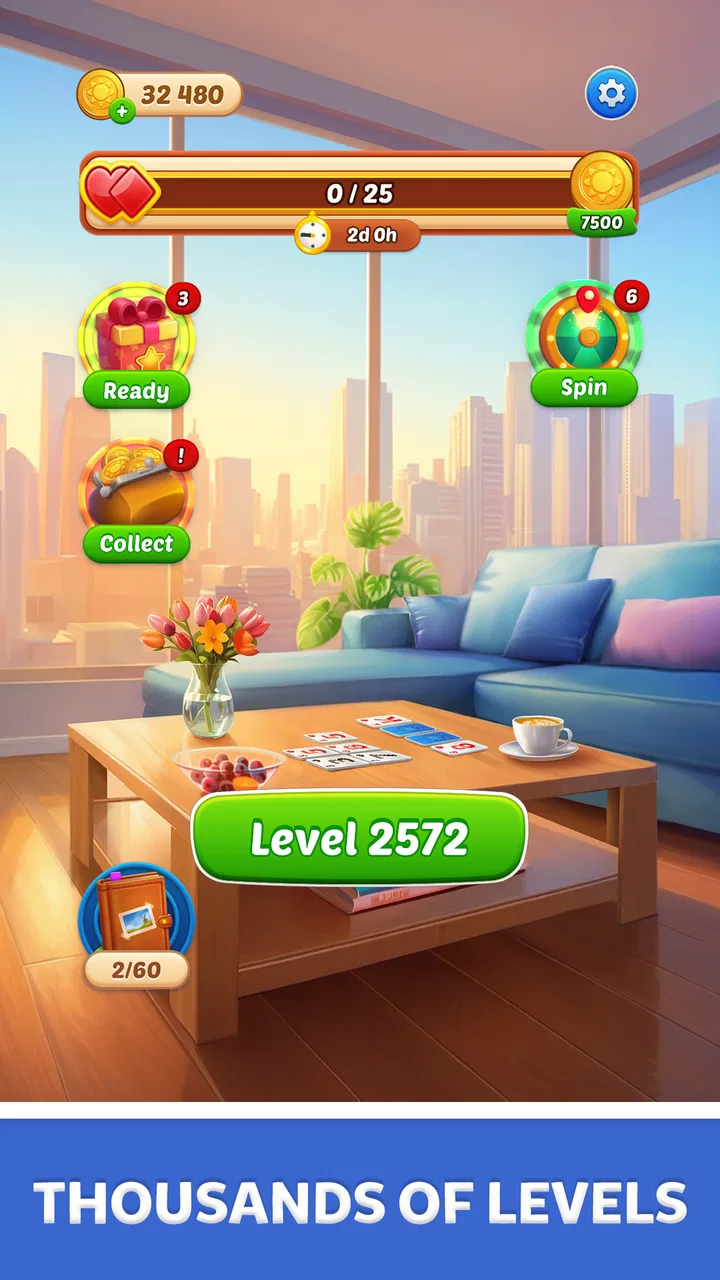
Solitaire Sunday: Card Game is a casual solitaire experience centered on classic card gameplay with a relaxing, themed presentation. It is designed for players who enjoy arranging cards, completing traditional solitaire layouts, and progressing through short sessions at their own pace. The game is easy to understand, although completing more difficult deals may require careful planning rather than simply tapping available moves.
02How do you play Solitaire Sunday: Card Game?
The main objective is to organize the cards according to standard solitaire rules, usually by building sequences in alternating colors and moving cards to foundation piles in ascending order. Players can reveal hidden cards, reposition stacks, and use available cards strategically. The controls are generally touch-friendly, so cards can be moved with taps or drag gestures, making the game suitable for both beginners and experienced solitaire players.
03Can Solitaire Sunday: Card Game be played offline?
Solitaire Sunday: Card Game may allow the core solitaire rounds to be played without a constant internet connection, which is useful when traveling or using limited mobile data. However, certain features may still require connectivity, including advertisements, online events, cloud synchronization, updates, or promotional content. It is best to launch the game once while connected and check which functions remain available after switching to offline mode.
04Is Solitaire Sunday: Card Game free to download and play?
The game is generally presented as a free download, allowing players to begin playing without purchasing it upfront. Like many free-to-play card games, it may include optional advertisements, in-app purchases, extra hints, cosmetic items, or other convenience features. You can usually enjoy the basic solitaire gameplay without spending money, but reviewing the store listing and device purchase settings is recommended before allowing transactions.
05Is Solitaire Sunday: Card Game suitable for beginners?
Yes, Solitaire Sunday: Card Game is suitable for beginners because the basic rules are familiar, the objective is straightforward, and touch controls make card movement simple to learn. New players can gradually understand the layout by following legal moves and using hints when available. More experienced users may also appreciate the challenge of planning several moves ahead and improving their completion rate over time.
Pros
- Relaxing solitaire gameplay suited to short or extended sessions.
- Simple controls make it accessible for beginners.
- Daily challenges add a reason to return regularly.
- Runs well for casual play without requiring advanced gaming skills.
- Bright card designs make suits and values easy to distinguish.
Cons
- Progress may feel repetitive for players seeking varied game modes.
- Some features may be locked behind ads or in-app purchases.
- Random deals can occasionally make rounds feel unwinnable.
- Frequent reminders or promotions may interrupt the relaxing pace.
- Offline functionality may be limited for certain rewards or features.

Solitaire Sunday: Card Game
Gallery